
AgilePresenter Mobile WIFI Presenter Remote
Note: This project is no longer maintained or supported.
The following information is provided solely for historical and legacy reference.
AgilePresenter Mobile WIFI Presenter Remote
Use this software to Remote-Control Powerpoint/Presentations from WIFI-enabled Phones!
Download AgilePresenter - FREE SOFTWARE 
Setup & usage
Download the latest release from https://github.com/ykasidit/AgilePresenter/archive/master.zip
Extract the zip/archive to
C:\AgilePresenteror somewhere similar.Double-click
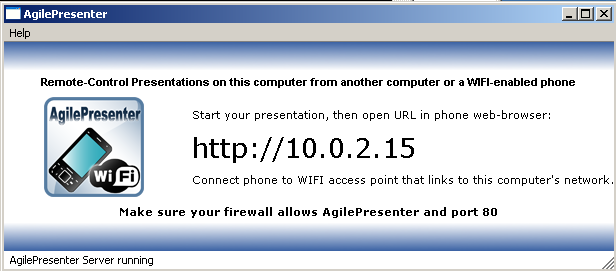
START_AGILE_PRESENTER.bat- if a firewall asks about permission, unblock and allow its port to be accessed from the local network.Connect phone to WIFI on the same network with your computer.
Start your Powerpoint/Presentation on computer.
Open you’re phone’s browser to the specified URL in AgilePresenter running on your computer… If there are no firewall problems, the page would load, you’d see a few buttons and the current screenshot of your PC - click the screenshot the simulate a click on computer making the presentation go next. Remote control your presentation from phone!
NOTE: If nothing shows up on phone
- Make sure your firewall is not blocking port 80
- Try using another URL by entering the
http://<IP of your computer>:- Right-click your currently connected connection > Status > Support and use that IP.
- Or
- Go to Start > Run … > cmd.exe > ipconfig - read for the IP of your WIFI connection - mostly in the form of 192.168.1.xx
Requirements
A WIFI-Enabled phone + a Windows XP/7 computer/notebook + WIFI access point: connecting the phone and the computer.
Source code
Please visit http://github.com/ykasidit/AgilePresenter
Questions & Comments
Please email <support[AT]clearevo.com> About
AgilePresenter was developed by Kasidit Yusuf. A lot of the code is based on a Qt C++ example. Please visit http://www.clearevo.com.
Special thanks
Thanks to Stuart Hanlon for all his great ideas and effort contributed to this project.